
Why Periti

Customer-Outcomes driven

Our focus is on ensuring that your systems, platforms and processes support you in doing business how you want to serve your customers.arrow

HubSpot Centric

Having deep expertise in HubSpot and other core business systems enables us to integrating and customize your tech stack seamlessly..arrow


Building a Bi-Directional Netsuite/HubSpot Integration: A Real World Guide in Three Parts - Part 2

Building a Bi-Directional Netsuite/HubSpot Integration: A Real World Guide in Three Parts - Part 2
8:53
Building a Bi-Directional Netsuite/HubSpot Integration: A Real World Guide in Three Parts - Part 2

From Discovery to Go-Live: Lessons From the Trenches


In Part 1 of our blog series, Building a Bi-Directional NetSuite/HubSpot Integration: A Real-World Guide in 3 Parts, we talked about the discovery and solution design phases of a recent, custom NetSuite/HubSpot integration we completed for a client in the manufacturing industry. In Part 2, we'll explore how we built the integration using AWS as middleware, navigating complex requirements that no off-the-shelf connector could handle.

Some background: This project spanned several months, involved late nights, holiday cutovers, a 147-item UAT tracker, and a few lessons. We worked alongside a NetSuite implementation partner, navigated shifting requirements, and ultimately delivered a system that converts closed-won HubSpot deals into NetSuite sales orders in near real-time, while syncing 30,000+ products nightly.

We're sharing this because the gap between, "how integrations should work in theory," and "what actually happens when you're three days from go-live and someone just added fifteen new UAT items," is vast. If you're considering a similar project, the specific challenges we faced, and how we solved them, might save you significant time and frustration.

This is what it actually looked like...


Part 2: Building the Integration


Architecture: AWS as Middleware

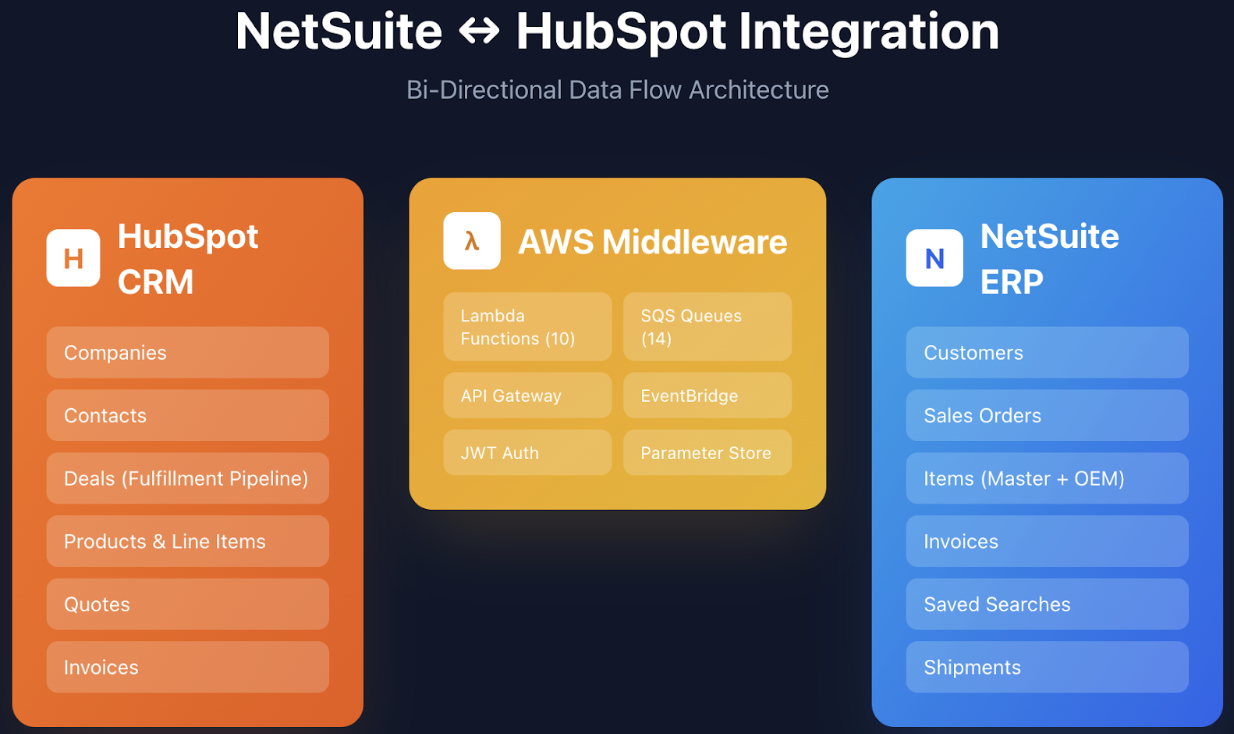
This custom integration used AWS as the middleware layer. This gave us flexibility that direct API connections wouldn't provide: we could queue operations, handle retries gracefully, log everything, and scale specific components independently.

The architecture had two main flows. The real-time flow triggered when a HubSpot deal moved to "Closed Won." This would fire a webhook to AWS, which would:

  • Process the deal data

  • Ensure associated companies were synced to NetSuite first

  • Retrieve the resulting NetSuite IDs

  • Create the sales order with proper company and address associations

The nightly batch flow ran at 2 AM, pulling data from six different NetSuite saved searches. These searches contained shipment statuses, order statuses, the master product library of sellable items, and customer credit limits and open balances calculated from invoices. This is because we didn’t want everything to come across!


Screenshot 2026-02-03 at 2.57.31 PM


The Nightly Sync: 30,000+ Products and Counting

NetSuite saved searches are powerful but quirky. We built AWS EventBridge rules to trigger Lambda functions at 2 AM that would:

  • Call the NetSuite API

  • Paginate through potentially tens of thousands of records

  • Transform the data to match HubSpot's expected format

  • Batch-update HubSpot products

One feature that proved invaluable: we built automated email reporting into the nightly sync. After each run, the system would concatenate all logs, including errors and success messages, and email a summary to relevant users. This gave operations staff an eagle-eye view of what happened overnight without needing to dig through AWS CloudWatch logs.


Credit Limits: Preventing Bad Deals at the Source

One of the most practical features we built was credit limit enforcement. The nightly sync pulled each customer's credit limit and their current open balance (calculated from unpaid invoices) into HubSpot. We then created HubSpot workflows that compared these values and flagged customers who had exceeded their credit limits or had payment bans.

The result? Sales reps couldn't accidentally create deals with customers who shouldn't be extended further credit. The system caught issues before they became accounting problems.


Custom Quote Templates: When Standard Won't Cut It


Our client needed quotes that looked exactly like their existing Word document templates, complete with specific table layouts, dynamic content based on whether it was a quote or an order confirmation, and proper line item numbering.

We built a completely custom quote template using HubSpot CMS. It featured hidden tables, personalisation tokens throughout, dynamic section visibility based on document type, and custom-coded workflows that added row numbers to line items based on the order they were added to the deal.

We also created automation so that when a sales rep set a shipping date on the deal, that date would automatically roll down to all associated line items. Small touches like this reduced manual work and prevented inconsistencies.


HubSpot Configuration: Workflows Upon Workflows

The HubSpot instance ended up with numerous complex workflows, many involving custom properties that relied on each other and updated based on nightly sync results. Record views were customised, card designs were modified, and the CRM was essentially rebuilt to support the integration.

Custom-coded workflows (using HubSpot's Data Hub Pro features) handled scenarios that standard workflows couldn't: complex property calculations, data transformations, and conditional logic based on associated record values.


Up Next: Part III -  Testing, Cutover, & Lessons Learned


Stay tuned for Part III of our series, Building a Bi-Directional NetSuite/HubSpot Integration! In our third and final installation, we'll cover the UAT and cutover phases of the project. Plus, we'll do a deep dive into what worked well for us during this project, and what we'd refine next time. 

If you're ready to discuss a HubSpot/NetSuite integration with a set of seasoned experts, please reach out to Periti Digital today!


Frequently Asked Questions

Why use AWS as middleware for a NetSuite/HubSpot integration, as opposed to a direct API connection?

AWS middleware provided critical flexibility that direct API connections couldn't offer. It allowed us to queue operations, handle retries gracefully, log everything comprehensively, and scale specific components independently. This architecture supported both real-time webhooks (when deals closed) and nightly batch processes, giving us the control needed for a complex, bi-directional integration.

 
What were the benefits of the nightly sync that ran during the NetSuite/HubSpot integration?

The nightly sync runs at 2 AM using AWS EventBridge rules that trigger Lambda functions. These functions call the NetSuite API, paginate through 30,000+ records from six different saved searches, transform the data to match HubSpot's format, and batch-update HubSpot products. The system automatically emails a summary report after each run, giving operations staff visibility into what happened overnight without needing to access AWS CloudWatch logs directly.

 
What is credit limit enforcement and why does it matter?

Credit limit enforcement pulls each customer's credit limit and current open balance from NetSuite into HubSpot during the nightly sync. HubSpot workflows then compare these values and flag customers who have exceeded their limits or have payment bans. This prevents sales reps from accidentally creating deals with customers who shouldn't be extended further credit, catching potential accounting problems before they happen.

 
How did you handle the custom quote templates?

We built a completely custom quote template using HubSpot CMS that replicated the client's existing Word document templates. The template features dynamic content based on document type (quote vs. order confirmation), personalisation tokens throughout, and custom-coded workflows that automatically number line items based on the order they were added. We also automated the process of rolling shipping dates from the deal down to all associated line items, reducing manual work and preventing inconsistencies.

 
What happens when a HubSpot deal closes?

When a deal moves to "Closed Won," it triggers a real-time workflow: a webhook fires to AWS, which processes the deal data, ensures associated companies are synced to NetSuite first, retrieves the resulting NetSuite IDs, and then creates the sales order with proper company and address associations. This near real-time conversion from closed deal to sales order was a core requirement that no off-the-shelf connector could handle.

 
What role did custom workflows play in the HubSpot configuration?

The HubSpot instance required numerous complex workflows, many using custom properties that relied on each other and updated based on nightly sync results. Using HubSpot's Data Hub Pro features, we created custom-coded workflows to handle scenarios standard workflows couldn't manage: complex property calculations, data transformations, and conditional logic based on associated record values. These workflows were essential for making the integration function as a cohesive system rather than just a data sync.